
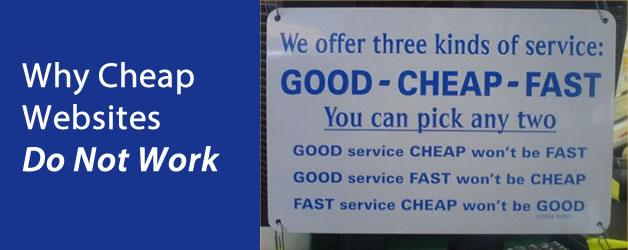
I hate the word ‘Cheap’, to me it is a dirty word. I feel sorry for other web designers who actually think that it offers them any sort of credibility to their name, on the contrary it just makes them look bad. Lets look at the synonym for ‘Cheap’
Cheap, inexpensive agree in their suggestion of low cost. Cheap now usually suggests shoddiness, inferiority, showy imitation, complete unworthiness, and the like: a cheap kind of fur. Inexpensive emphasizes lowness of price (although more expensive than cheap ) and suggests that the value is fully equal to the cost: an inexpensive dress. It is often used as an evasion for the more specific cheap. 4. paltry, low, poor, inferior, base.
I certainly do not want my business nor myself to be perceived like this, how about you ?
To build a professional website for your small business needs a professional approach, we are not building you a personal blog as a hobbie, this is your lively hood, this is your online image and generally the first place a potential customer will look even before they pick up the phone or visit your premises. The importance of having a good looking, functional, conversion driven website should be in your businesses top priority list.
Reasons Why Cheap Websites Do Not Work
In web design cheap websites do not work because cheap usually signifies shortcuts are needed to be made to achieve the outcome within a budget. Web design firms like almost any business type works on an hourly rate basis, depending on how long the job takes will ultimately depend on the final price. With web design there are a significant amount of processes that need to be done in order to clearly communicate the clients needs and wants. Not only this there is an element of competitor research that needs to be done also to determine what you need to achieve to become an authority figure amongst your competitors.
If your competition has clearly spent thousands of dollars on web design and internet marketing do you really think that your $500 website will make an impact to your potential clients ? Who do you think your clients will choose as the deciding factor when making a choice between 3 choices, the one that looks unprofessional, cheap, amateur or vise versa ?
No one works for free, but if you are deciding to engage a web design firm that is offering you the world for $500 then you need to take a step back and consider what the potential outcome will be. The fact of the matter is time is money and $500 will only get you so far, cheap website design providers will NOT give you personal service, will not NOT visit you for a one on one consultation and will NOT truly value your business relationship, and they certainly will NOT spend time and effort if giving you the results you want. Going for a cheap website may actually be a total waste of your time and investment maybe even tarnish your reputation.
Over the years we have heard all too many times of unsatisfied clients who have had to redesign their small business website because of poorly communicated deliverables and an overall bad experience dealing with cheap web design companies. This is why cheap websites do not work and should be given more value.
So your not looking for a cheap website but how much should i spend on my website ?
Generally for a startup business online presence should be included in the startup costs, however if you are an existing business and you want a website for your business then it should be part of your marketing costs. A businesses marketing budget should be between 4 and 12 percent of the gross turnover of the business, so an example of a businesses turning over under $1 million dollars the marketing budget should be around $25,000. The amount that should be allocated to your website is up to you. Generally thou, your website is the starting point so a general rule of thumb is to spend as much as is needed to make an impact when you go live.
If the cliche ‘Don’t judge a book by its cover’ was true then there would be no need to spend much money on website design, unfortunately visitors to your website will have an opinion of you within the first 30 seconds of landing on your website whether consciously or sub-consciously, make the right first impression, make an impact and get people talking about your website it will be well worth the effort, time and money you spend.
If your looking at pushing your business further into the online market or would like further advice on this matter please call us on 1300 855 465 to discuss your needs.
If you enjoyed reading our article ‘Why Cheap Websites Do Not Work’ please share it.
[sharethis]